

Homebrew install is one of the most searched topics among macOS users who want an easier way to manage software, developer tools, and command-line utilities.
Homebrew is a package manager designed specifically for macOS that simplifies the process of installing, updating, and managing software through the Terminal. Instead of downloading .dmg files or manually compiling code, users can install applications with a single command.
When you perform a homebrew install, you gain access to thousands of open-source packages including programming languages, databases, security tools, and productivity utilities. Developers, cybersecurity learners, and system administrators rely on Homebrew to maintain a clean and efficient development environment.
The process is straightforward. You open Terminal and paste the official installation command from the Homebrew website. Once installed, you can use the brew install command followed by the software name to add tools to your system.
This package manager also handles dependencies automatically, which saves time and prevents compatibility issues.Homebrew works seamlessly with macOS architecture including Intel and Apple Silicon chips.
It installs packages into its own directory and does not interfere with system files, making it safe and reliable for both beginners and advanced users.
Why Choose Homebrew Install
Choosing homebrew install provides flexibility, speed, and automation for macOS software management. Instead of manually searching for installers online, Homebrew centralizes everything into a simple command-line system.
This reduces security risks associated with downloading software from unknown sources.Homebrew also supports version control and quick updates. With a single command, you can update all installed packages, keeping your system secure and optimized.
Developers particularly benefit from this because they often need multiple tools such as Git, Node.js, Python, and Bash enhancements.Another key advantage is dependency management.
When installing a package, Homebrew automatically installs any required libraries. This prevents broken setups and saves troubleshooting time. If you ever want to remove software, a single uninstall command cleans everything without leftover files.
For learners exploring cybersecurity or software development, Homebrew creates a professional workflow environment. It mirrors Linux-style package management, which helps when transitioning between macOS and Linux servers. Overall, it improves productivity, organization, and system control.
How to Install Homebrew on Mac
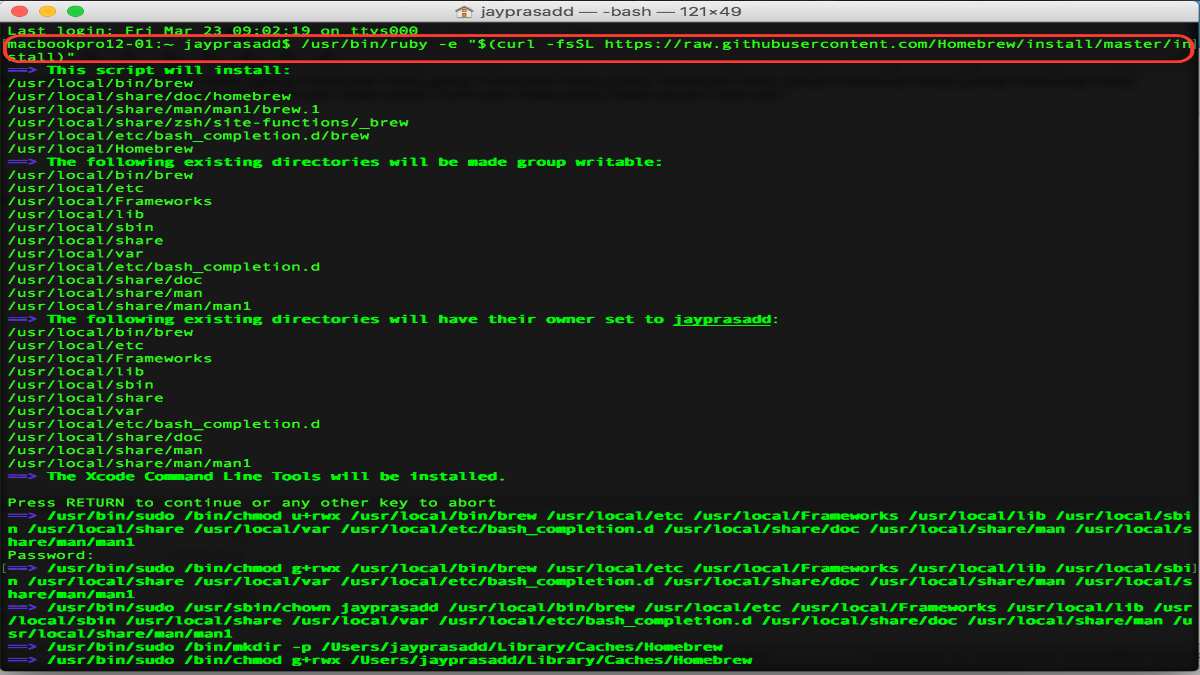
If you are wondering how to install Homebrew on Mac, the process is simple and takes only a few minutes. First, ensure you have macOS 10.15 or later and that Xcode Command Line Tools are available.
This command downloads and runs the official installation script. The script checks system requirements, creates necessary directories, and installs brew into the correct path.
After installation, you may need to add Homebrew to your PATH environment variable, especially on Apple Silicon Macs.If it displays the current version, the setup is successful. This answers the common question: How to install Homebrew on Mac? It requires only Terminal access and internet connectivity.
After installation, you can begin installing packages using brew install Many developers immediately install Git, Python, or Node.js to configure their environment.
Fixing “zsh: command not found: brew”
One common error after homebrew install is: zsh: command not found: brew. This usually occurs because the brew binary is not added to the system PATH variable.
Another cause may be incomplete installation. In that case, reinstall Homebrew using the official script. Always ensure you follow the official instructions carefully and avoid third-party sources.
Understanding this error is important because many beginners assume installation failed, when in reality it is just a PATH configuration issue. Once fixed, Homebrew functions normally and allows smooth software management.
Brew Install Python and Pip
One of the most common uses of homebrew install is installing programming languages. For example, brew install python is widely used by developers and cybersecurity students.
Homebrew installs the latest stable version of Python along with pip, the Python package manager. In many cases, you do not need to run a separate homebrew install pip command because pip is bundled with Python installations.
Using Homebrew ensures your Python installation does not interfere with macOS system Python. This separation prevents accidental system breakage and maintains stability.
It also simplifies managing multiple development tools. Whether building web apps or exploring automation scripts, installing Python through Homebrew provides a clean and reliable setup.
Homebrew Install Bash and Other Tools
Another practical application of homebrew install is upgrading shell environments. macOS ships with an older version of Bash due to licensing limitations. Users who need modern shell features can run:
This installs the latest GNU Bash version. After installation, you can set it as your default shell by modifying system settings. This is particularly helpful for developers writing advanced shell scripts.
Beyond Bash, Homebrew supports thousands of packages including Git, Docker, MySQL, and more. Installing software follows a consistent pattern.
This command structure makes learning and using Homebrew intuitive. It saves time compared to manual installations and ensures dependencies are properly managed.
Professionals prefer Homebrew because it centralizes system management. Instead of downloading separate installers, everything is handled within Terminal, keeping workflows efficient and organized.
Homebrew Install 3DS, Wii, and Switch Explained
Search terms like homebrew install 3ds, homebrew install wii, and homebrew install switch refer to console modification communities. These topics are unrelated to macOS Homebrew. In gaming contexts, “homebrew” refers to unofficial software developed for gaming consoles.
It is important to understand the difference. macOS Homebrew is a legitimate package manager for installing open-source tools. Console homebrew often involves modifying device firmware, which can void warranties or violate terms of service.
If your goal is macOS software management, focus only on the official Homebrew project. Mixing the two can cause confusion because they share the same word but serve entirely different purposes.
Always ensure you are downloading software from official and legal sources. For macOS users, Homebrew remains a safe and widely trusted development tool.
Is It Necessary to Install Homebrew on a Mac?
Many users ask: Is it necessary to install Homebrew on a Mac? The answer depends on your needs. Casual users who only browse the web and use built-in applications may not require it.
However, developers, cybersecurity learners, and IT professionals benefit significantly from Homebrew. It simplifies installing programming languages, penetration testing tools, and server software. Instead of manually configuring each tool, Homebrew automates the process.
So while it is not mandatory, it is highly recommended for anyone working with development or system administration tasks on macOS.
Is Installing Homebrew Illegal?
A common concern is: Is installing homebrew illegal? The answer is no. The macOS Homebrew package manager is completely legal and open-source. It distributes free and open-source software and follows proper licensing agreements.
Problems only arise when people confuse it with console modification communities. Installing the official Homebrew package manager on macOS is safe, legal, and widely accepted in professional environments.
Many companies, developers, and cybersecurity experts rely on Homebrew daily. It is hosted publicly and maintained by a large open-source community. As long as you use it to install legitimate software, there are no legal issues.
Conclusion
If you are asking, How to install something via Homebrew? the process is simple. First, search for the package:This workflow makes package management structured and efficient.
Whether installing Python, Bash, or other development tools, Homebrew streamlines everything into manageable commands.
Homebrew install transforms macOS into a powerful development environment. It improves efficiency, maintains organization, and simplifies software management for professionals and learners alike.
