

Keeping your Mac running fast and smooth is not always easy. Over time, Macs accumulate unnecessary files, caches, and apps that slow down performance.
Clean My Mac X is a popular tool designed to help users clean, optimize, and manage their Mac devices safely and efficiently. With its simple interface, even beginners can remove junk files, malware, and old apps without risking important data.
The software also offers features for privacy protection, including removing browser history and tracking cookies. Many users report improved speed and storage space after using Clean My Mac X.
It works on all recent macOS versions and provides regular updates to ensure compatibility.
For those concerned about cost, Clean My Mac X offers both a free trial and paid versions. The free trial lets users explore essential cleaning features, while the paid version unlocks advanced tools like malware removal, app uninstaller, and system health monitoring.
Whether you are a casual user or a professional, Clean My Mac X is trusted by millions to maintain Mac performance. In this article, we’ll cover its features, comparisons, pricing, and alternatives.
Clean My Mac X – Features You Should Know
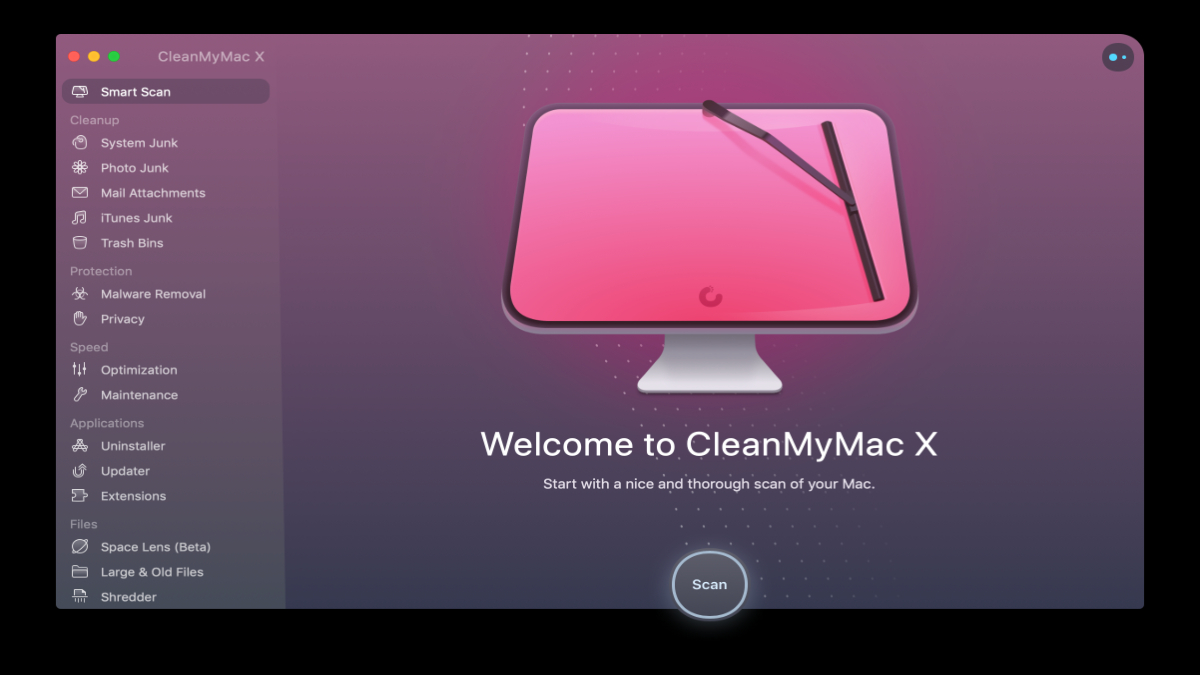
Clean My Mac X comes with several tools designed to make Mac maintenance simple:
- Smart Scan – Quickly checks your Mac for junk files, malware, and performance issues.
- System Junk Cleaner – Removes cache files, logs, and temporary files to free up storage.
- Malware Removal – Scans for malware and adware to keep your Mac safe.
- Privacy Protection – Deletes browsing history, cookies, and chat data.
- App Uninstaller – Completely removes apps along with all leftover files.
- Optimization Tools – Frees up RAM, manages login items, and speeds up Mac performance.
These features make Clean My Mac X a one-stop solution for Mac users. Its clear interface allows users to see exactly what is being cleaned, so you don’t have to worry about deleting something important.
Additionally, Clean My Mac X provides regular software updates. This ensures the tool works efficiently with the latest macOS versions and protects your system from new threats.
Clean My Mac X Download – How to Get It
Downloading Clean My Mac X is simple and safe. Users can visit the official website and choose either the free trial or the paid version. The download process is straightforward:
- Go to the official Clean My Mac X website.
- Click on the Download Free Trial button.
- Once the file is downloaded, open the installer and follow the on-screen instructions.
- After installation, launch the app to begin scanning and cleaning your Mac.
It is important to avoid downloading Clean My Mac X from unofficial websites. These versions may contain malware or offer outdated software that could harm your Mac.
Clean My Mac vs Clean My Mac X – What’s the Difference?
Many users wonder whether to choose Clean My Mac or Clean My Mac X. Here’s a quick comparison:
- Clean My Mac – Older version, limited features, basic cleaning tools.
- Clean My Mac X – Latest version with advanced cleaning, malware protection, and optimization tools.
Clean My Mac X is better suited for users who want full Mac maintenance in one tool. It provides enhanced security features, better performance optimization, and compatibility with modern macOS updates.
Clean My Mac X Free – Is It Worth Trying?
The free version of Clean My Mac X allows users to explore basic features without payment. You can clean junk files, run a smart scan, and check system health. However, some advanced tools, like malware removal and app uninstaller, require a paid subscription.
Trying the free version is a good way to see how the app works. Many users find that after using the free version, upgrading to the paid version provides noticeable improvements in speed and storage management.
Clean My Mac X Reviews – What Users Say
Users in the USA and around the world generally give positive feedback for Clean My Mac X. Reviews highlight:
- Ease of Use: Beginners can navigate the interface easily.
- Performance Boost: Macs run faster after cleaning.
- Safety: No important files are deleted during scans.
- Comprehensive Tools: Provides everything from junk cleaning to malware protection.
While some users feel the paid version is slightly expensive, most agree that the value for improved Mac performance is worth the cost.
Clean My Mac X Free Alternative
If you are looking for a free alternative, there are options like:
- OnyX – Free macOS maintenance tool for cleaning and optimization.
- AppCleaner – Free app uninstaller for removing leftover files.
- Malwarebytes for Mac – Free version for malware detection and removal.
While these alternatives work, they often require manual effort and may not provide the same all-in-one convenience as Clean My Mac X.
Clean My Mac X Price – How Much Does It Cost?
Clean My Mac X offers subscription-based pricing:
- Free Trial – Limited features.
- One-Year License – Usually around $39.95 per year.
- Lifetime License – One-time payment around $89.95.
Pricing varies slightly based on promotions and updates. The lifetime version is ideal for long-term Mac users, while the yearly subscription works well for temporary needs.
Clean My Mac X Account – Setting Up & Logging In
After purchase, users can set up a Clean My Mac X account to manage licenses and subscriptions. Steps include:
- Open Clean My Mac X and click Log In.
- Enter the registered email and password.
- Your license will automatically activate, unlocking all features.
Having an account allows you to manage multiple devices and keep track of updates and renewals.
Clean My Mac X Login – Troubleshooting
Sometimes users face login issues. Common solutions include:
- Checking your internet connection.
- Ensuring you are using the correct email and password.
- Updating Clean My Mac X to the latest version.
- Contacting customer support for persistent problems.
These simple steps usually resolve most login-related issues quickly.
Conclusion
Clean My Mac X is a reliable, all-in-one solution for Mac users in the USA. It offers tools to clean junk files, protect privacy, remove malware, and optimize system performance. With positive reviews, a safe download process, and subscription flexibility, it is a trusted choice for maintaining Mac devices.
For users seeking free alternatives, OnyX, AppCleaner, and Malwarebytes provide basic solutions. However, Clean My Mac X remains the most convenient and comprehensive option.
Whether you are a casual user or a professional, investing in Clean My Mac X can improve your Mac’s speed, security, and overall performance.
