

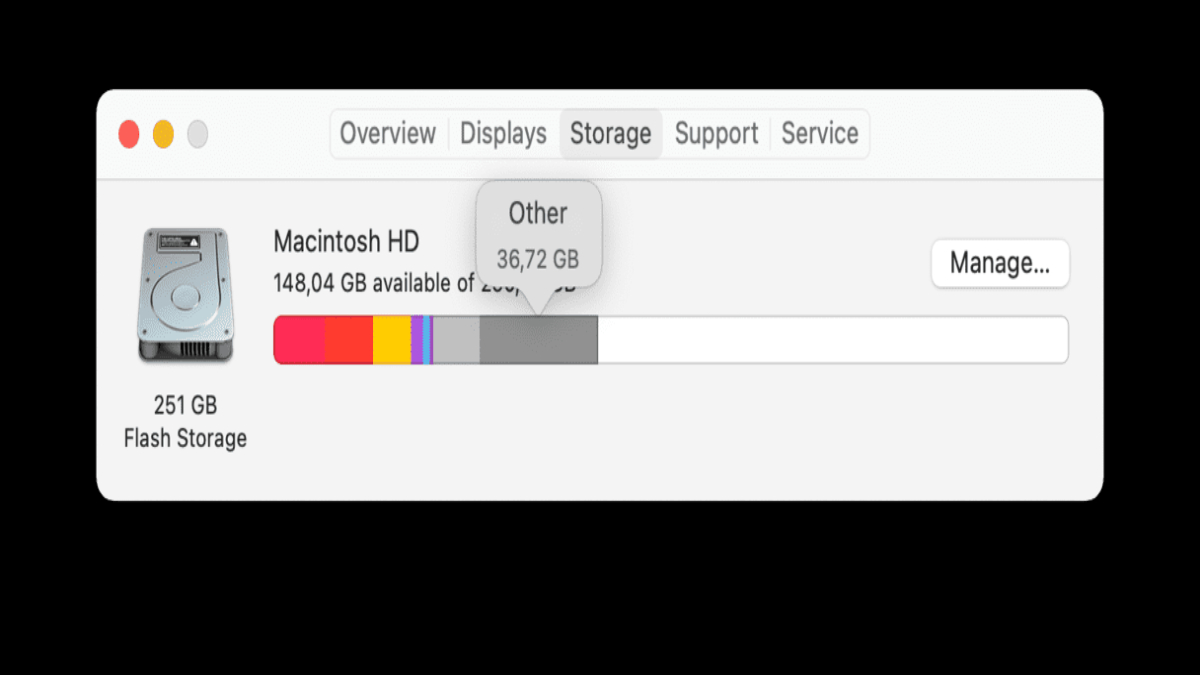
If you have ever checked your Mac’s storage and noticed a large grey section labeled “Other,” you may wonder what is Other on storage on Mac and why it takes so much space.
This category often confuses users because it does not clearly show what files are included. In simple terms, “Other” is a collection of files that do not fit into standard categories like Apps, Photos, Documents, Audio, or System.
Other storage can include cache files, temporary files, log files, system data, browser data, email attachments, plugins, extensions, disk images, archives like ZIP files, and even leftover files from deleted apps.
Over time, these files accumulate silently in the background. That is why many users notice that mac other storage is huge without understanding why.
On modern versions of macOS such as macOS Ventura or macOS Sonoma, Apple has improved storage categorization. However, the “Other” or “System Data” section can still grow significantly.
Understanding what is other on storage on mac is the first step before learning how to manage or remove it safely. Once you know what is inside, you can clean your Mac without deleting important system files.
What Is Other on Storage on Mac and What Does It Include?
When asking what is other on storage on mac, it is important to understand what types of files fall into this category. Apple groups miscellaneous data into “Other” because it does not match predefined labels. This often includes:
- Cache files created by apps and browsers
- Temporary system files
- App support files
- Plugin and extension data
- Old iOS backups
- Disk images (.dmg files)
- Compressed archives (.zip, .rar)
- Fonts and language files
- Log files
If you browse forums like what is other on storage on mac reddit, you will see many users complaining that their storage fills up suddenly. In most cases, cached data and app leftovers are the main reason.
Another concern is why does Other storage keep increasing on my Mac? The answer is simple: every time you use apps, browse the internet, or install updates, new temporary and support files are created.
If they are not cleaned automatically, they remain stored.So when mac other storage is huge, it usually means hidden background files have accumulated over months or even years of usage.
How to View Other Storage on Mac
Before deleting anything, you should know how to view other storage on mac properly. Apple provides a built-in storage management tool that makes this easy.
Follow these steps:
- Click the Apple logo in the top-left corner.
- Select “About This Mac.”
- Go to the “Storage” tab.
- Click “Storage Settings” or “Manage.”
This tool shows a storage bar that breaks down categories. On newer macOS versions, “Other” may appear as “System Data.” You can click recommendations to review large files and unused apps.
If you are wondering how to check storage on MacBook Air, the process is exactly the same. Whether you use a MacBook Air, MacBook Pro, or iMac, Apple uses the same storage interface.
For deeper inspection, you can:
- Open Finder
- Click “Go” in the menu bar
- Hold the Option key
- Select “Library”
Inside the Library folder, you will find caches, logs, and support files. This helps you understand exactly what is filling the Other storage category.
How to Delete Other Storage on Mac Safely
Many users search how to delete other storage on mac or even how to delete other storage on mac – youtube tutorials. While videos can help visually, you should understand the correct process to avoid deleting important system files.
Here are safe methods:
1. Delete Cache Files
- Open Finder
- Click Go > Go to Folder
- Type: ~/Library/Caches
- Delete unnecessary cache folders
2. Remove Old Backups
Check for old iPhone or iPad backups stored locally:
- Go to Finder
- Open ~/Library/Application Support/MobileSync/Backup
- Delete outdated backups
3. Remove Large Files
Use Finder search:
- Press Command + F
- Filter by file size (e.g., larger than 100 MB)
- Delete unwanted large files
4. Uninstall Unused Apps Completely
Dragging an app to Trash does not remove support files. Check:
~/Library/Application Support
This answers common questions like:
- How do I get rid of Other storage on my Mac?
- How do I delete the Other in storage?
- How do I delete the Other way on my Mac?
The key is manual cleanup plus smart storage management.
Why Does Other Storage Keep Increasing on My Mac?
One of the most common concerns is: Why does Other storage keep increasing on my Mac? The reason lies in daily usage patterns.
Every app creates support files. Web browsers store cookies and cache data. Streaming platforms store temporary data. Messaging apps save attachments. Even system updates leave residual files.
If you frequently:
- Download files
- Install and uninstall apps
- Use editing software
- Sync iPhones
- Browse heavily online
Then your Other storage grows automatically.
Also, system logs and temporary files are generated in the background. While macOS manages some cleanup, it does not remove everything.
Users on forums discussing how to delete other” storage on mac reddit often discover that neglected cache folders are the main cause. Regular maintenance prevents this issue.
How to Buy More Storage on Mac
Sometimes cleaning is not enough, especially if your device has a small SSD. Many users ask how to buy more storage on mac.
Important point: On most modern Macs, internal storage cannot be upgraded after purchase, especially models with Apple Silicon chips.
Your options include:
- Use External SSD – A fast external drive provides extra space for large files.
- Cloud Storage – iCloud, Google Drive, or Dropbox.
- Optimize Storage – Enable “Optimize Mac Storage” in iCloud settings.
If you use iCloud, you can move files to the cloud and free up local storage automatically.Buying more internal storage usually means purchasing a new Mac with higher capacity. So before upgrading hardware, always clean Other storage first.
FAQs
Mac Other Storage Is Huge – What Should I Do?
Start by checking storage breakdown. Then remove large files, clear caches, and delete unused apps.
How Do I Delete the Other in Storage?
You cannot delete “Other” directly. You must remove the files inside that category manually.
How to Delete Other Storage on Mac Reddit Solutions
Many Reddit users suggest:
- Clearing browser caches
- Deleting Xcode files (if installed)
- Removing old iOS backups
- Cleaning Downloads folder
These methods are generally safe if done carefully.
Conclusion
Understanding what is other on storage on mac helps you take control of your device. Other storage is not a mysterious virus or hidden threat. It is simply a collection of miscellaneous files such as cache, logs, backups, and app support data.
If mac other storage is huge, the solution is regular cleanup. Learn how to view other storage on mac, delete unnecessary files safely, and monitor growth over time. If needed, consider external drives or cloud storage instead of immediately replacing your Mac.
By following the right steps, you can answer questions like how to delete other storage on mac, how do I get rid of Other storage on my Mac, and why does Other storage keep increasing on my Mac without risking important system files.
A clean Mac runs faster, smoother, and more efficiently. Regular maintenance keeps your storage optimized and prevents the Other category from taking over your valuable disk space.
